
Knowledge Base
FAQ – HR, Time Tracking, Professions
Last updated on April 6th, 2026
Time Tracking
Q: What are “professions” and how do they differ from staff setup?
A: Professions are labour types such as electrician, apprentice, or fabricator, and they carry the standard cost and price rates used for that type of work. Staff are the individual people in your organisation. Staff are linked to the professions they can perform, which controls scheduling and time entry. The usual setup flow is to define professions first, then link each staff member to the professions they are allowed to perform.
Q: Can staff log time retrospectively, or must it be real-time?
A: Both are supported. Staff can either run a live timer or enter their time retrospectively. For many trade businesses, retrospective entry at the end of the day or week is the more practical operating pattern, even though both methods feed the same reporting and costing outputs.
Q: Must labour be on the BOM for workers to log time against a job?
A:Yes. The relevant profession must be on the job’s BOM before time can be recorded against that job for that profession.
Q: I’m trying to log time on the Bulk Time Entry page, but I can’t see the activity I need to log.
A: First, check whether you have the Custom Activities add-on enabled. When enabled, there is a feature on this page that prevents mass entry of activities users are not authorised to perform. The tasks are considered authorised if they have been set up as custom earning rates on the staff’s page. In the case where no earning rates have been set for staff, this can result in no activities being available for selection on the Bulk Time Entry page. See the Custom Activities article for more information on how to set these up.
Pay and Recording Costs
Q: How does overtime calculation work?
A: Automated overtime handling is available through the Advanced Payroll add-on. It supports pay templates and configurable daily or weekly thresholds so different time bands can be allocated to the correct earning activities and rates. Overtime should be configured with its own cost treatment rather than assumed to be a simple multiplier of the base rate, because on-cost treatment can differ between standard and overtime hours.
Q: What’s the difference between “customer billable” and “timesheet billable” time?
A: Customer billable time is intended to flow through to customer charging. Timesheet billable time is recorded for payroll or internal time purposes without necessarily being invoiced to the customer. When time is internal rather than job-related, it is commonly recorded against non-job tasks instead of being allocated to a customer job.
Q: How do we handle staff who use both Gojee and a separate payroll system?
A: That usually requires exporting time data from Gojee and importing or entering it into the payroll system. Common exports include the time summary and staff activity reports. If you use Xero Payroll, a more direct workflow is available there.
Q: Should base cost include superannuation and on-costs?
A: Yes. Base cost should be the fully loaded cost to the business, not just the headline wage rate, so job profitability is reported accurately. That usually includes superannuation, leave loading or leave provisions, insurance, payroll tax where relevant, and other employment on-costs that affect the true labour cost.
Q: Timesheets for staff aren’t being generated in Gojee for the current payrun. (Xero payroll)
A: Gojee creates its draft timesheets based on the previous payrun’s end date. If you delete the current draft payrun in Xero, syncing Gojee with Xero should allow the previous payrun’s timesheets to be created.
Some technical detail: Xero’s payroll calendar StartDate is defined as the upcoming pay period, and Xero advances it once a pay run exists for the current period. Gojee creates timesheets when it is synced with Xero based on this date. If you want Gojee to create the current pay period, that period must still be the upcoming period in Xero, meaning its pay run has not been created yet. Once the current period is opened in draft in Xero, Gojee will move on to generating timesheets for the next period.
User Accounts
Q: How do we set up user accounts and access permissions?
A: With existing staff in Gojee (either Xero synced staff or Gojee-only staff), you are able to give them user status and assign the appropriate access templates for the roles they need, such as purchasing, invoicing, or scheduling. The Xero organisation owner needs to initialise the organisation before normal user setup can proceed. In the usual setup flow, as soon as the staff is saved with access roles, they then receive a login email.
Q: How do I re-send the invite email to Gojee?
A: It is not currently possible to re-send the initial email. It is possible that the invite email may have been caught under a spam filter, so please have the user check their spam folders for the original invite. The invite link expires after 24 hours, so if the original invite link was sent over 24h ago, the user will need to follow the procedure outlined below.
-
Confirm the email address that was registered as the staff’s login email. If it is not correct, please let us know and we can fix it from our end.
-
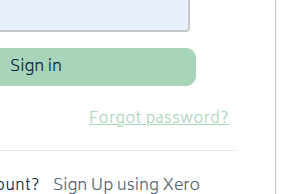
If the email is correct, then have them click the Forgot Password? link on the login page:
-
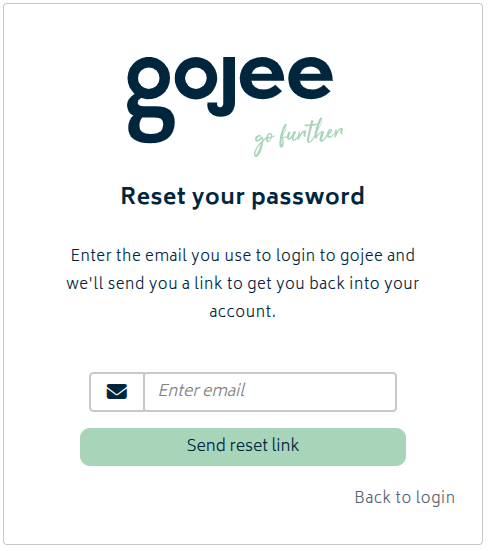
The user should enter their email address (the one that was registered as the login email) on the Reset Password screen:
-
This will send a new mail to their email address that will contain a link to set their password.
Q: Is it possible to merge two Gojee accounts?
A: It is not possible to merge Gojee accounts. If you have made a mistake and find yourself with 2 user accounts, one Gojee active and one Xero active, there are steps you can do to make the Xero-linked staff into also being Gojee staff. Simply apply the same roles, professions, and information to the staff entry that was synced over from Xero. Have the user log in and switch to the other login entry via My Account. Once everything is moved over and the user is logged into the other account, make the employee not connected into a non-user and save. Please note that you will also need to remove all tasks scheduled for the first staff in order to remove their professions. It is not possible to deactivate staff in Gojee that are scheduled for jobs.