Knowledge Base
FAQ – Quoting, Invoicing and Payment
Last updated on April 16th, 2024
Quoting and Invoicing
Q: Can I create an invoice before the Bill of Materials is finalised, or before ordering any stock for the job?
A: Yes, although the kind of invoice you want to create will differ based on the type of job. The BOM is there to help you build quotes, but if your organisation has a different workflow it’s still possible to invoice without filling every part of it out.
- You can use the Create Invoice from Quote from the Job Actions > Invoices page. You can use a draft quote/estimate as a starting point. However, since the BOM is not finalised, you may need to modify the General Quote Amount and remove items which are not finalised.
- You can also use the New Invoice button. For Do and Charge jobs, this will by default pull in only items which have been consumed onto the job. For fixed price jobs, you can remove any items you don’t want to see and use the “+ Add a new line” button to create new line items you can customise to your liking.
If you just want to receive money prior to starting the job, though, you can also use prepayments to achieve the result you want.
Q: What’s the difference between fixed-price and do-and-charge (time & materials) jobs?
A: Fixed-price: customer pays the quoted amount regardless of actual costs. Do-and-charge: customer pays based on actual time/materials consumed, with options for markup on actual cost, BOM price, or latest catalogue price.
Q: Can customers approve quotes online directly?
A: This is not currently supported by Gojee. Quotes require manual communication with the customer and external confirmation. This has been raised as a feature request.
Q: Can we customise invoice numbers to match our job numbers?
A: Invoice numbers in Gojee are sequential. To customise, you must edit in Xero after the fact.
Q: Why don’t terms and conditions appear on my quotes/invoices?
A: T&Cs require branding theme template configuration in Xero. Must switch from default “Gojee Branding” to your custom Xero template.
Q: What’s the difference between Gojee job numbers, Xero quote numbers, and invoice numbers?
A: They are all separate numbering systems. Job numbers are auto-generated in Gojee (with override option). Quote/invoice numbers come from Xero.
Q: How does stage-based / progress claim invoicing work?
A: The Progress Claims & Retentions module (add-on) supports milestone-based invoicing with retention percentages. This must be enabled separately.
Q: Why isn’t the quote/invoice updating in Gojee when it updates in Xero?
A: Xero sync is one-way only for invoices, quotes, and purchase orders. Changes in Xero, other than payment, will not affect the quote/invoice/PO in Gojee.
Payment
Q: What options do I have for accepting payment in Gojee?
A: There are presently two options for taking payment from within Gojee – cash payments and digital payments processed through Square. In Xero, you can also record bank transfers which will be processed through the nightly Xero sync and visible in Gojee.
You can take cash payments directly from within Gojee for all invoices and prepayments. If you enable Square integration, you will also be able to take card payments through Square either physically or digitally. Please refer to the Organisation Add-ons page for more information.
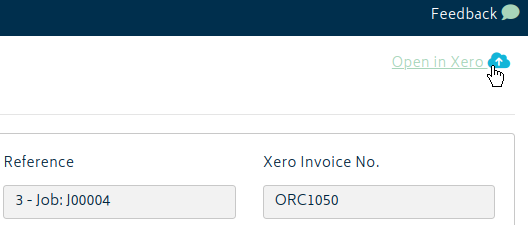
Bank transfers can be recorded through Xero for invoices. On any invoice, click Open in Xero at the top right.
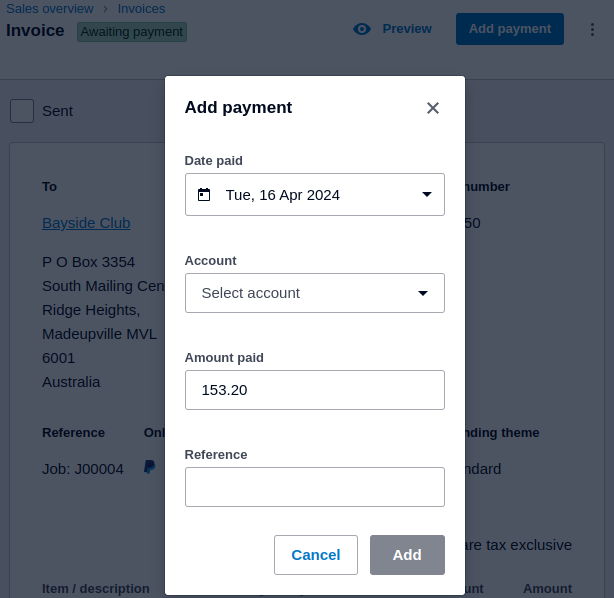
From there, you can record payments to your organisation’s bank or other fund accounts.
If you wish to see the payments in Gojee immediately, you can go to My Account and force sync invoice payments with the Sync Xero Now button.
Taxation
Q: Tax is incorrectly applied/not applied to my invoice when it shouldn’t/should be, how can I fix this?
A: The Xero accounts set up for the transaction control whether GST/taxation occurs. For example, in this Xero account there are two sales accounts – one for domestic and one for international sales. Bear in mind that the example is an Australian account, and international accounts will have different terminology for GST exclusivity.

When the invoice is in Draft stage, you can set up the accounts for each line item on the invoice.

When I approve the invoice, one of these line items is using Sales and the other International Sales. This will charge tax on one but not the other, as can be seen here.
Just make sure the accounts are set up properly in Xero and you’ll be able to set or remove tax from each line item.